Lifecycle Methods
In our game engine, scripts written in Lua have access to specific lifecycle methods. These methods are automatically called by the engine to manage the behavior of scripts throughout the lifecycle of game objects. Understanding these methods is crucial for effectively controlling game logic, rendering sequences, and resource management.
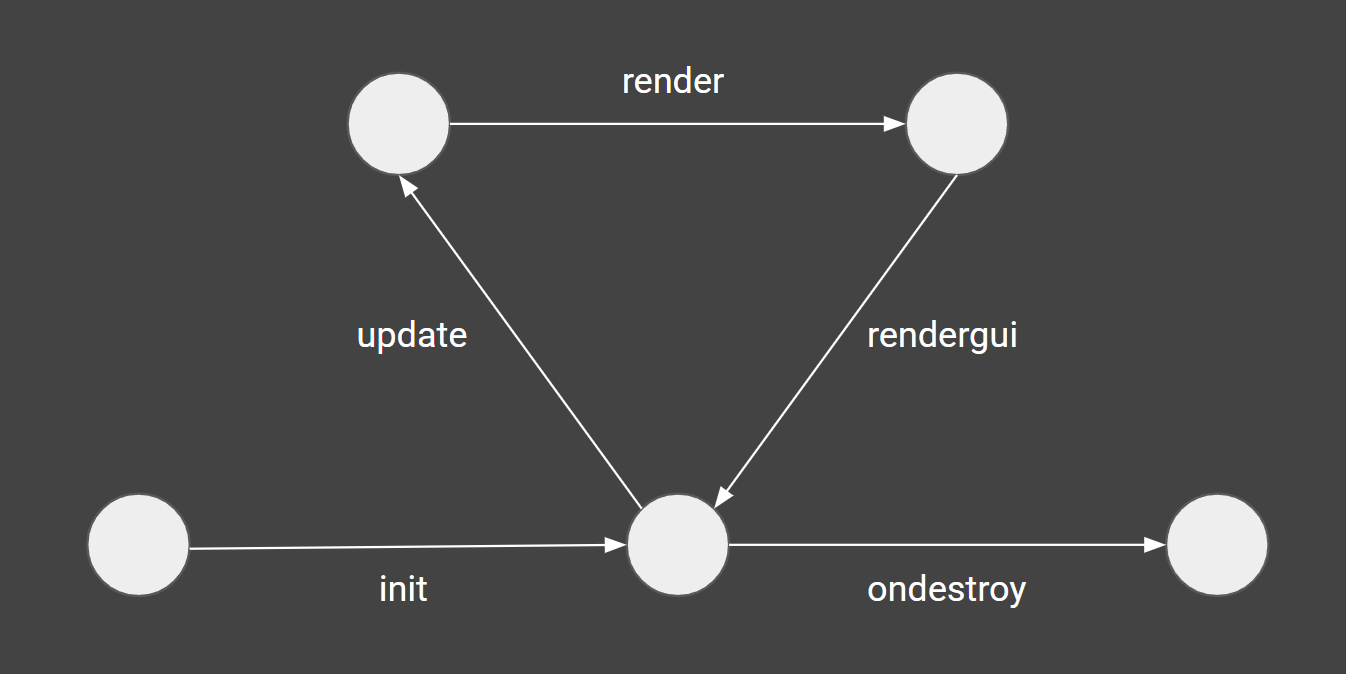
Lifecycle flow chart
Overview of Lifecycle Methods
Here are the primary lifecycle methods that your scripts can implement:
- init()
- update(deltaTimeMs, deltaTimeSmoothedMs)
- preUpdate(deltaTimeMs, deltaTimeSmoothedMs)
- lateUpdate(deltaTimeMs, deltaTimeSmoothedMs)
- render()
- rendergui()
- onenable()
- ondisable()
- ondestroy()
- onpause()
- onresume()
Below, we detail each method, its purpose, and its typical use cases.
init()
This method is called when a script is initially loaded and is generally used to set up initial state, bind events, or initialize variables. It is executed only once per script instance.
update(deltaTimeMs, deltaTimeSmoothedMs)
The update() method is called repeatedly and is designed to handle the bulk of your game logic such as movement, input handling, and other frame-dependent operations. This method is called once per frame before rendering starts. It will also get two parameters which you can use to adjust any animations you are doing to the time that has passed.
- deltaTimeMs will contain the milliseconds passed since the last frame
- deltaTimeSmoothedMs will also contain the milliseconds that have passed but they will be averaged over the last 20 frames
function MyBehaviour:update(deltaTimeMs, deltaTimeSmoothedMs)
    local dt = deltaTimeMs / 1000
    -- Code to update game state, scaled by dt when needed
end
preUpdate(deltaTimeMs, deltaTimeSmoothedMs)
The preUpdate hook is executed before the update hook and can be used to execute certain logic before any other behaviour has their update hook called.
lateUpdate(deltaTimeMs, deltaTimeSmoothedMs) ^^^^^^^^^^^^^^^^^^^^^^^^^^^^^^^^^^^^^^^^^^^ Similar to preUpdate, this hook is called after all other behaviours had their update hook called to make sure your logic runs after that.
render()
This method allows you to implement custom rendering code that executes during the scene's render pass. It's useful for drawing custom visuals or for making last-minute changes to the render state.
rendergui()
This method is specifically called to render GUI elements using ImGui functions. It is ideal for creating overlays, menus, and interactive GUI components within the game.
onenable()
Executed when the script is enabled. This is useful for re-initializing state when objects become active again.
ondisable()
Called when the script is disabled. Use this to clean up or save state temporarily when objects or components are deactivated.
ondestroy()
This method is invoked just before the script's instance is destroyed. It is used for important cleanup activities, such as releasing resources, saving state, or properly detaching events.
onpause()
This method is called automatically when the game is paused, either from the editor or the player’s pause button.
Use this to store any state you might need to adjust when the game resumes — for example, saving a timestamp so timers don’t keep counting while the game is paused.
onresume()
This method is called when the game continues after being paused.
Use this to restore state or make timing adjustments to ensure the game logic remains consistent.
Best Practices
- Performance Considerations: Since update() is called frequently, ensure that the code within is optimized and does not contain heavy computations.
- Resource Management: Utilize ondestroy() to manage and release resources that are no longer required by the script.
- State Management: Use onenable() and ondisable() to manage changes in script behavior when game objects are activated or deactivated.
Understanding and properly implementing these lifecycle methods will help you effectively manage your game logic and rendering tasks within the engine.