Variable Sets
Variable sets let you define typed named values (integer, float, string, boolean) with defaults, then read and write them from Lua. A Variable Set is a reusable item — the same definition can be linked from the project (shared world state) or from individual scene objects (per-instance state such as health on a player or enemy).
There are two scopes:
| Scope | Where you attach the set | How scripts access it | |
|---|---|---|---|
| Project (global) | Project inspector → Variable sets |
|
|
| Node (per instance) | Scene object inspector → Variable sets |
|
|
Project sets are shared by every script. Node sets give each scene object its own copy of the values — two enemies linking the same Variable Set item do not share one health value.
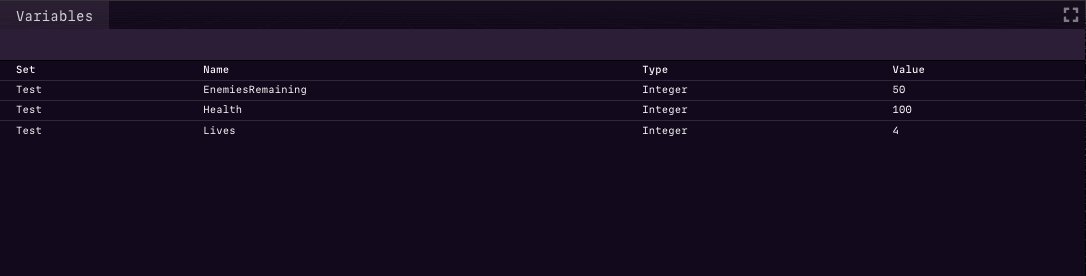
Values reset to their defaults when playback starts or stops. During play, the Variables view shows current values (useful for debugging).
Creating a Variable Set item
- Open the Project item in the inspector (or create the item from the asset browser).
- Under Variable sets, add an entry and create or link a Variable Set item. The entry Name is required — it is the runtime set name scripts use (for example
Variables.Game.score). If you leave Name empty when linking, it defaults to the Variable Set item's name; you can rename it to a short name such asGameorCombat. - Open the Variable Set item and add variables: name, type, and initial value.
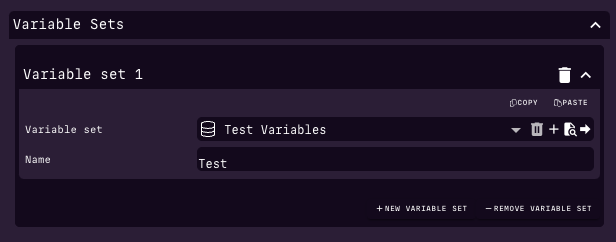
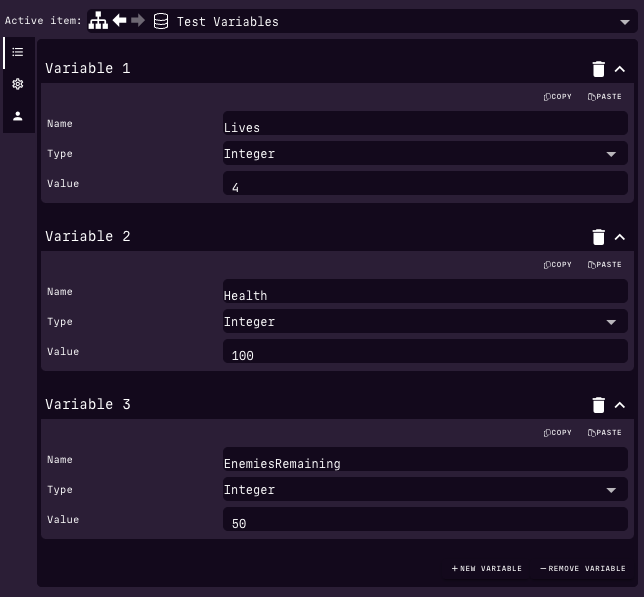
Check the Variables view: your variables should appear. During playback the view updates live.
Attaching a set to a scene object
Most scene objects (Player, Mesh, Group, Camera, …) have a Variable sets list in the inspector at the bottom of the node fields (just above Scripts), under a collapsed Variable Sets section.
- Select the node (for example an
SgPlayer). - Add a Variable sets entry and link the same (or another) Variable Set item.
- Set the entry Name (required) — this is the name you use in
node.variables.Name.…. Leaving Name empty when linking defaults it to the Variable Set item's name.
You can attach several sets to one node, and reuse one Variable Set item across many nodes. Definitions are shared; runtime values are per node. Without a Name the set is not registered and scripts cannot access it.
Project variables from Lua
Use the engine/variables module. See also Variables API.
local Variables = require 'engine/variables'
local Canvas = require 'engine/canvas'

local MyBehaviour = Class.new(Behaviour)

function MyBehaviour:init()
  Variables.Test.Set = 1
  Variables.Test.Added = Variables.Test.Added + 4
end

function MyBehaviour:render()
  local set = Variables.Test.Set
  local initial = Variables.Test.Initial
  local added = Variables.Test.Added

  Canvas.setFillColor(255, 255, 255, 1)
  Canvas.setFont("20px Arial")
  Canvas.fillText("Initial: " .. tostring(initial), 20, 40)
  Canvas.fillText("Set: " .. tostring(set), 20, 60)
  Canvas.fillText("Added: " .. tostring(added), 20, 80)
end

return MyBehaviour
Node variables from Lua
Scripts on (or holding a reference to) a scene object use the node.variables proxy (mirrors the global Variables property API).
local MyBehaviour = Class.new(Behaviour)

function MyBehaviour:init()
  self.node.variables.Combat.health = 100
  self.node.variables.Combat.ammo = self.node.variables.Combat.ammo + 1
end

function MyBehaviour:update(dt)
  if self.node.variables.Combat.health <= 0 then
    print("Player defeated")
  end
end

return MyBehaviour
From another script that has a node reference (for example a Property.Node field pointing at the player):
Useful accessors on the node:
node.variables/node:getVariables()— Variables-like proxy (preferred)node.variables:getSet(setName)— returns a VariableSet handlenode:getVar/node:setVar/node:addVar/node:resetVar— method equivalents when you need them
Listening for changes
Changing a variable emits a variableChanged event.
Global listener (project and node sets):
local Events = require 'engine/events'

Events.on('variableChanged', function(e)
  -- e.set, e.name, e.value
  -- e.nodeId is set when the change was on a scene object
  print(e.set, e.name, e.value, e.nodeId)
end)
Per-node listener (only that object's variables), using game events:
function MyBehaviour:init()
  self.node:on("variableChanged", function(e)
    -- e.data.set, e.data.name, e.data.value
    print("Local var changed", e.data.name, e.data.value)
  end)
end
See Events for the full variableChanged field table.
When to use which scope
- Project — score, lives, unlock flags, shared timers, anything every script should see as one value.
- Node — health, ammo, AI state, or any value that belongs to a specific player, enemy, or prop instance.
A common pattern is a shared Variable Set item (for example CombatStats with health / armor) linked on many enemy nodes under the same entry Name, while each enemy keeps its own runtime values.