SgVehicle
Represents a physics-based vehicle composed of a chassis and one or more wheels. This class provides methods to control acceleration, braking, and steering directly from scripts.
Vehicles are useful for driving simulations, car games, or any physics-based scene where a rigid body with multiple wheel colliders is required.
Inherits from
Overview
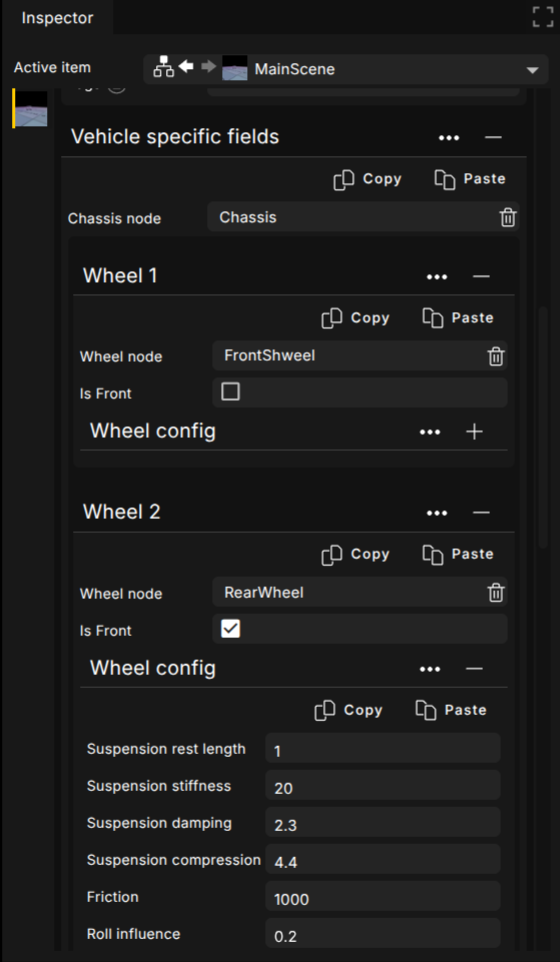
A vehicle in the scenegraph consists of:
Chassis: the main body of the vehicle. This must have physics enabled (as a rigid body) so that forces and collisions are simulated correctly.
Wheels: individual wheel scene objects attached to the chassis. Do not enable physics on these; the vehicle system handles their motion internally.
Each wheel is automatically constrained and simulated according to its suspension and friction parameters defined in the editor or script.
You can distinguish front and rear wheels by their index or naming convention, and apply different steering or acceleration values to each group. Typically, front wheels handle steering, while rear wheels handle acceleration and braking, but this configuration is fully customizable.
In order to setup a vehicle correctly in Lemonate follow these steps:
Create the chassis
Add an SgVehicle object as a scene object.
Ensure “Enable Physics” is checked in the editor (or set in script).
The chassis should have a collision shape, typically a box or convex hull.
Add the wheels
Add four (or more) wheel scene objects as children of the chassis.
Do not enable physics on the wheels — they are automatically managed by the vehicle system.
Order or naming of the wheels determines their index, which you can use to apply controls per wheel (e.g., front-left = index 0).
Configure the vehicle
Use the vehicle editor parameters or Lua API to fine-tune suspension, friction, and wheel alignment.
If needed, attach a script to the Vehicle node so you can you can dynamically control steering, acceleration, and braking in Lua. See Basic vehicle setup Lua example.
Usage
To use this class, add the following require at the top of your script:
local SgVehicle = require 'engine/sceneobjects/sgvehicle'
Reference
- class SgVehicle
- module:
- static create(options, parent)
Create a new vehicle object in the scenegraph.
- Parameters:
options (
table) – A table of options to fill the parametersparent (
SceneObject) – The parent scene object to add this to
- Returns:
a promise which will resolve to the created object
- Return type:
Promise
Usage:
 1
 2
 3
 4
 5
 6
 7
 8
 9
10
11
-- Options can be omitted. This example shows the defaults,
-- only specify the ones you want different.
SgVehicle.create({
    active = true,
    name = "",
    transform = Transform.new(),
    layers = {0},
    tags = {},
    receiveShadow = false,
    castShadow = false
})
- getSpeed()
Get speed in km/h of the vehicle
- setSteering(wheels)
Set the steering of the vehicle
- Parameters:
wheels (
table) – an array of { index, value } objects setting a new steering value for wheels
- setBrakes(wheels)
Set the brakes of the vehicle
- Parameters:
wheels (
table) – an array of { index, value } objects setting a new brake value for wheels
- setAcceleration(wheels)
Set the acceleration of the vehicle
- Parameters:
wheels (
table) – an array of { index, value } objects setting a new acceleration value for wheels
Examples
local Keys = require 'engine/keys'
local Events = require 'engine/events'
local SgVehicle = require 'engine/sceneobjects/sgvehicle'

-- Simple car controller example
local Car = Class:new(Behaviour)

-- Wheel indices (as set in the vehicle editor)
local WHEEL_FRONT_LEFT  = 0
local WHEEL_FRONT_RIGHT = 1
local WHEEL_REAR_LEFT   = 2
local WHEEL_REAR_RIGHT  = 3

function Car:init()
    self.vehicle = self.node  -- The attached SgVehicle
    self.input = { w = false, s = false, a = false, d = false }

    -- Listen for key presses
    Events.on('keydown', function(e)
        if self.input[e.key] ~= nil then
            self.input[e.key] = true
        end
    end)

    Events.on('keyup', function(e)
        if self.input[e.key] ~= nil then
            self.input[e.key] = false
        end
    end)
end

function Car:update()
    if not self.vehicle then return end

    -- Acceleration (rear wheels)
    local accel = self.input.w and 5.0 or 0.0
    self.vehicle:setAcceleration({
        { index = WHEEL_REAR_LEFT,  value = accel },
        { index = WHEEL_REAR_RIGHT, value = accel }
    })

    -- Braking (all wheels)
    local brake = self.input.s and 50.0 or 0.0
    self.vehicle:setBrakes({
        { index = WHEEL_FRONT_LEFT,  value = brake },
        { index = WHEEL_FRONT_RIGHT, value = brake },
        { index = WHEEL_REAR_LEFT,   value = brake },
        { index = WHEEL_REAR_RIGHT,  value = brake }
    })

    -- Steering (front wheels only)
    local steer = 0.0
    if self.input.a then
        steer = 2.5   -- turn left
    elseif self.input.d then
        steer = -2.5  -- turn right
    end
    self.vehicle:setSteering({
        { index = WHEEL_FRONT_LEFT,  value = steer },
        { index = WHEEL_FRONT_RIGHT, value = steer }
    })
end

return Car